
 Go to live site ↗
Gaia: Planning, cooking, serving and counting every school meal
Planning, cooking, serving and counting every school meal
The product I designed as Gaia's founding designer: the back of house kitchens run on, and the front of house where every meal is served and paid for.
Why
School nutrition is a regulated food business that still runs on binders, par sheets and one person's spreadsheet. Model the kitchen right once, and nobody has to type the same number twice.
Model the kitchen first
Menus, recipes and production records shaped around how a real team works.
Compliant while you plan
Every day checked against the meal pattern before anyone cooks it.
Shortages before service
Forecasts, inventory and orders linked, so Tuesday's missing buns show on Friday.
One price at the register
Eligibility sets the price, so no one in line sees who eats free.
At a glance
- Role
- Founding designer, product designer and product manager
- Since
- April 2023
- Scope
- Back of house and front of house, in one system
- Tags
- Product design, product management, information architecture, compliance
The full story
One system for every school meal, from the menu to the register
School nutrition is a regulated food business that looks like a cafeteria. A district plans its menus months ahead, cooks thousands of meals a day across dozens of kitchens, and has to prove every one of them to the USDA to be paid for it. A school lunch only counts if it meets the meal pattern for that grade group: so many cups of vegetables a week, so much whole grain, a ceiling on sodium, and a different set of rules for breakfast, for snacks and for four-day weeks.
Most districts still run this on binders, par sheets, an old recipe database and one person's spreadsheet. Gaia replaces all of it with one system. I joined as its founding designer in April 2023 and have worked as its product designer and product manager since, designing the whole platform: the back of house that kitchens and the director's office use every day, and the front of house families and cashiers see.
This piece follows the whole chain: the back of house, from a menu to the last leftover checked back into stock, and then the front of house, where the meal is served and paid for. The back of house is the part of Gaia I am proudest of, and the part where design mattered most, because most of the hard problems were not screens. They were models.
1. Model the kitchen first
The best work I did at Gaia was deciding what a menu, a recipe and a production record actually are. A school nutrition team works inside an almost infinitely complex web of requirements: federal programs, state rules, grade groups, cycle menus, satellite schools, vendors, allergies, leftovers and audits. Every one of those pieces touches the others. If the objects underneath are wrong, every screen built on top of them inherits the mess, and no amount of interface polish fixes it.
So before drawing anything, I mapped how a real team works: who plans the menu, who cooks it, who orders the food, who counts what was served, and what each of them needs from the person before them. That map became the structure of the product. A menu is published once and everything downstream reads from it. A recipe carries its own nutrition, credits and cost, so it can never disagree with itself. A production record is created by the menu, not typed in after lunch. The rule that held all of it together is simple to say and hard to keep: nobody should ever type the same number twice.
2. Menu planning
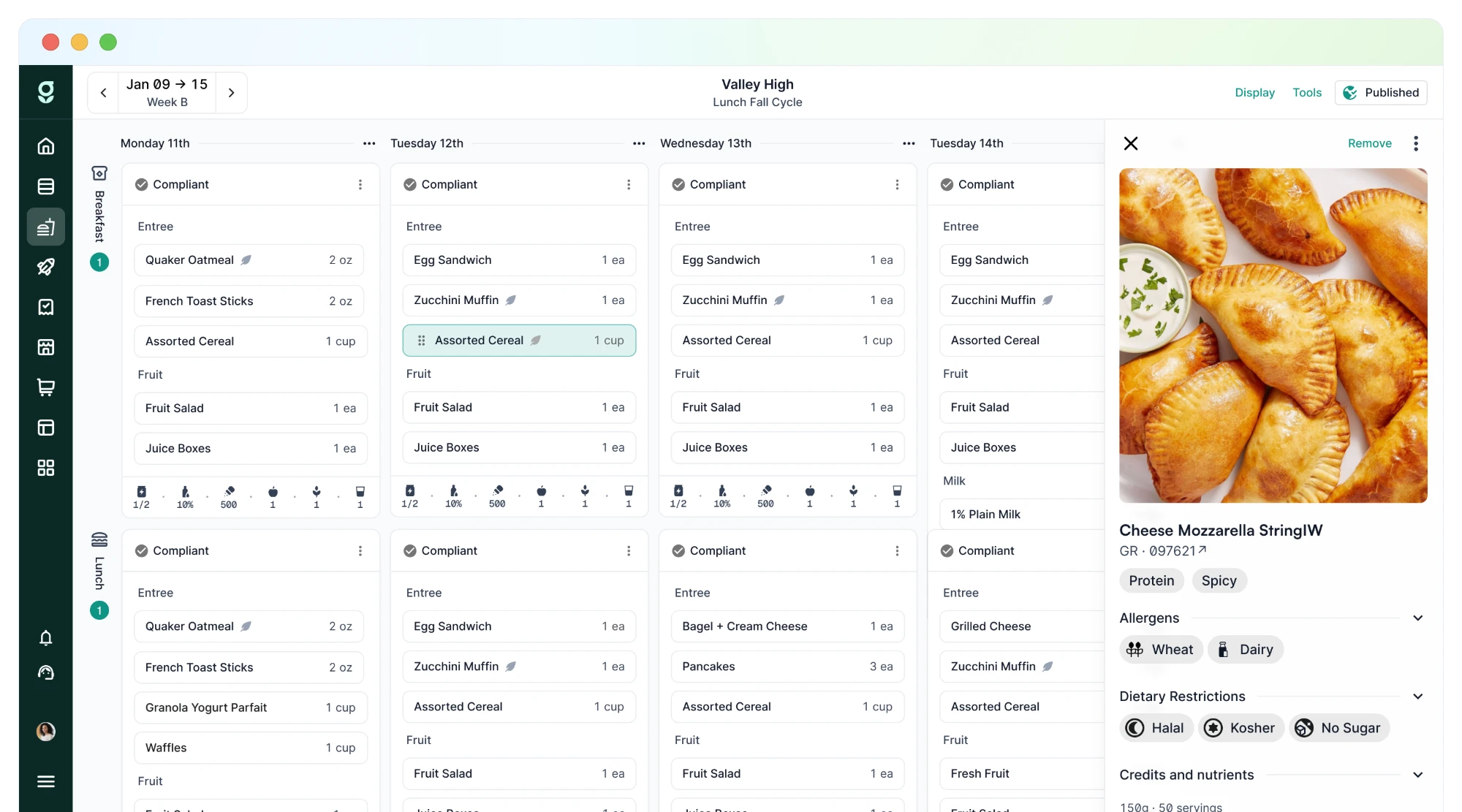
The menu planner is where a director spends much of their time, so it is the screen that got the most attention. It plans by day, school and cycle, with drag and drop for meals, recipes and ingredients, and it checks compliance with the meal pattern while the director works rather than the week before a review.
Every day carries its own status. A card says Compliant or tells you what is missing, and a strip of small indicators at the bottom of each day shows the components that matter for that grade group: fruit, whole grain, sodium, meat, grain and milk. Click a recipe and a panel opens beside the week with its photo, its allergens, its dietary restrictions and its credits and nutrients, so the director can check a dish without leaving the plan.
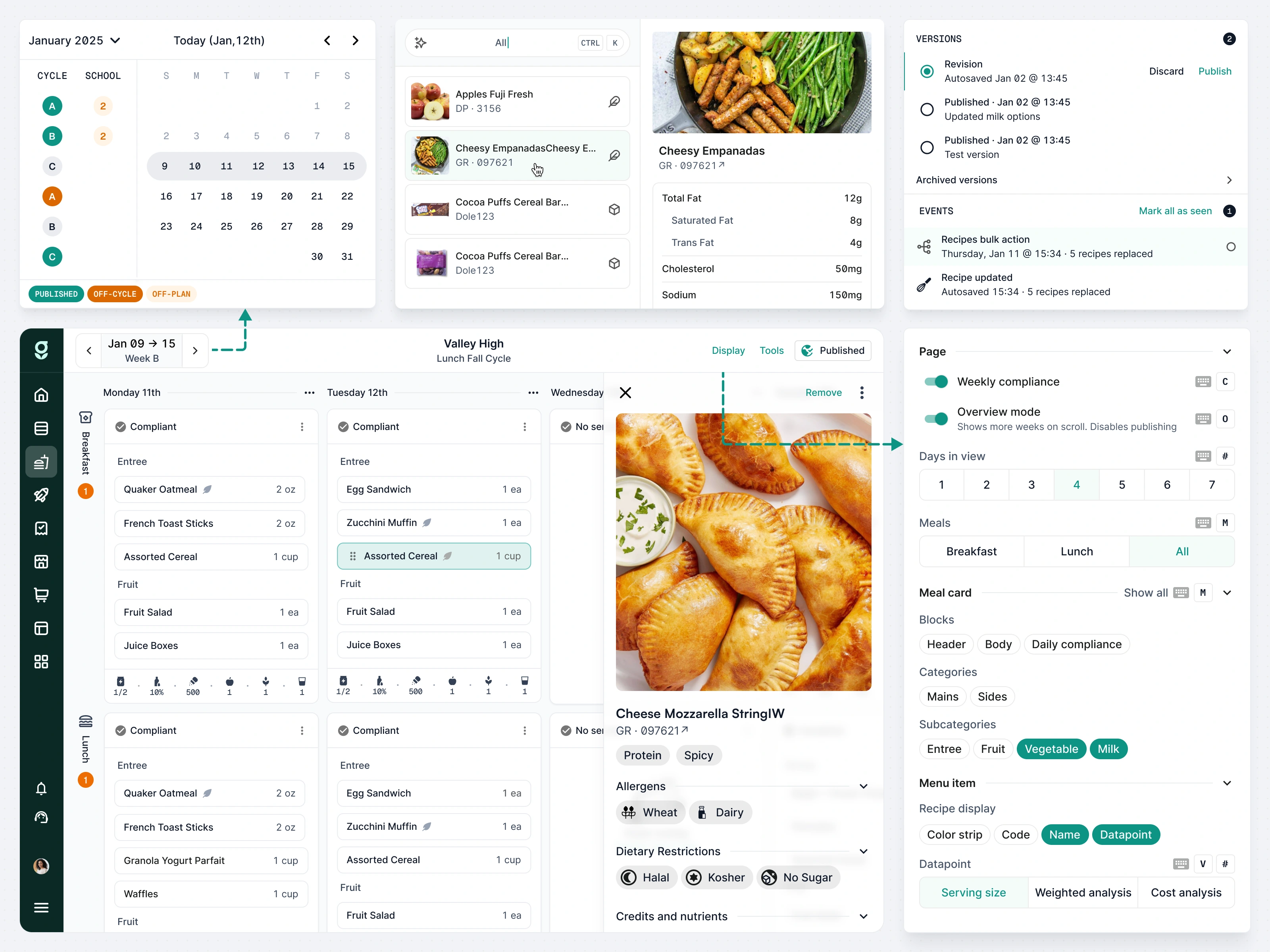
The details around the planner are where the real calendars live. Districts rotate menus in cycles, so the calendar shows both the cycle week (A, B, C) and the school week, and marks days that are published, off cycle or off plan. Recipe search sits a keystroke away and shows nutrition before you commit. Every change is autosaved as a revision, published versions are kept with a note, and an events log records bulk actions like five recipes replaced at once, so a director can see what changed and who changed it.
Display settings were a deliberate choice. Directors read menus very differently: some want a whole month in overview, some want four days with every datapoint. Instead of picking one, the planner lets each person choose the days in view, the meals, the blocks on each meal card, how recipes display (color strip, code, name) and which datapoint sits beside them: serving size, weighted analysis or cost. Most settings have a keyboard shortcut.
3. Food items and recipes
Everything a kitchen cooks starts as an item in the pantry. A food item knows its category, its manufacturer and codes, its tags, and every product it is bought in: a bag of one gallon, a box of 32 packets of two ounces, each with its own price per serving. It also knows how many servings are in stock right now.
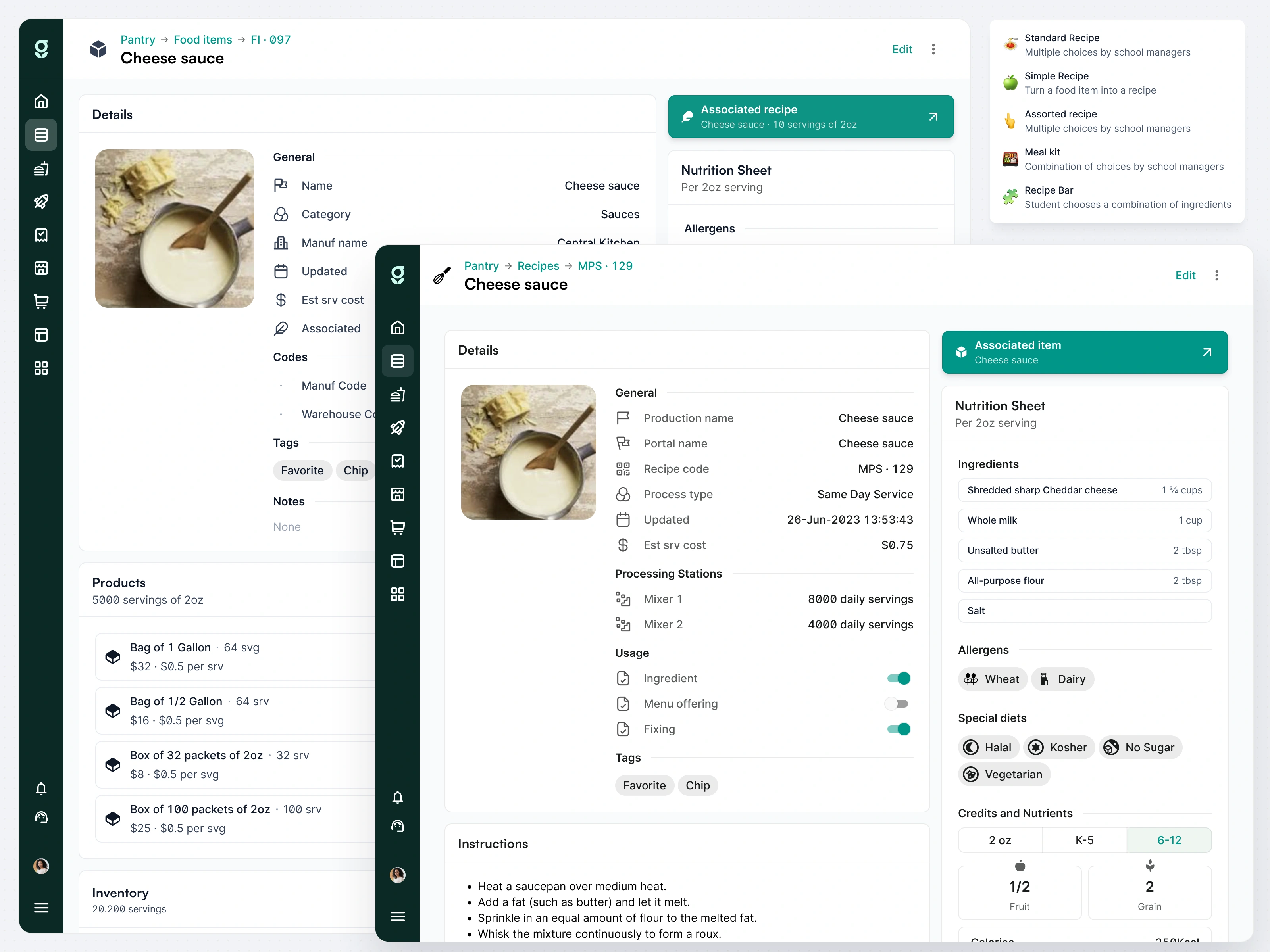
Recipes are where the modeling paid off most. A cheese sauce is a recipe made from cheddar, milk, butter and flour, and it is also an ingredient in other recipes, so the item and the recipe are linked both ways instead of copied. Usage toggles decide whether a recipe can be an ingredient, a menu offering or a fixing. Processing stations carry a daily capacity, so a central kitchen knows Mixer 1 can make eight thousand servings a day and Mixer 2 half that. Credits and nutrients are shown per grade group, because the same recipe credits differently for K-5 than for 6-12.
Not every school meal is one dish, so recipes come in five types: a standard recipe, a simple recipe that turns a food item into something you can put on a menu, an assorted recipe where school managers pick among choices, a meal kit, and a recipe bar where students build their own combination.
4. From forecast to shopping
The menu says what will be served. The hard part is getting the right food onto the right shelf before that day. This is where Gaia made its biggest advances, by tying forecasting, inventory and ordering together so a kitchen sees a shortage before it happens instead of on the morning of service.
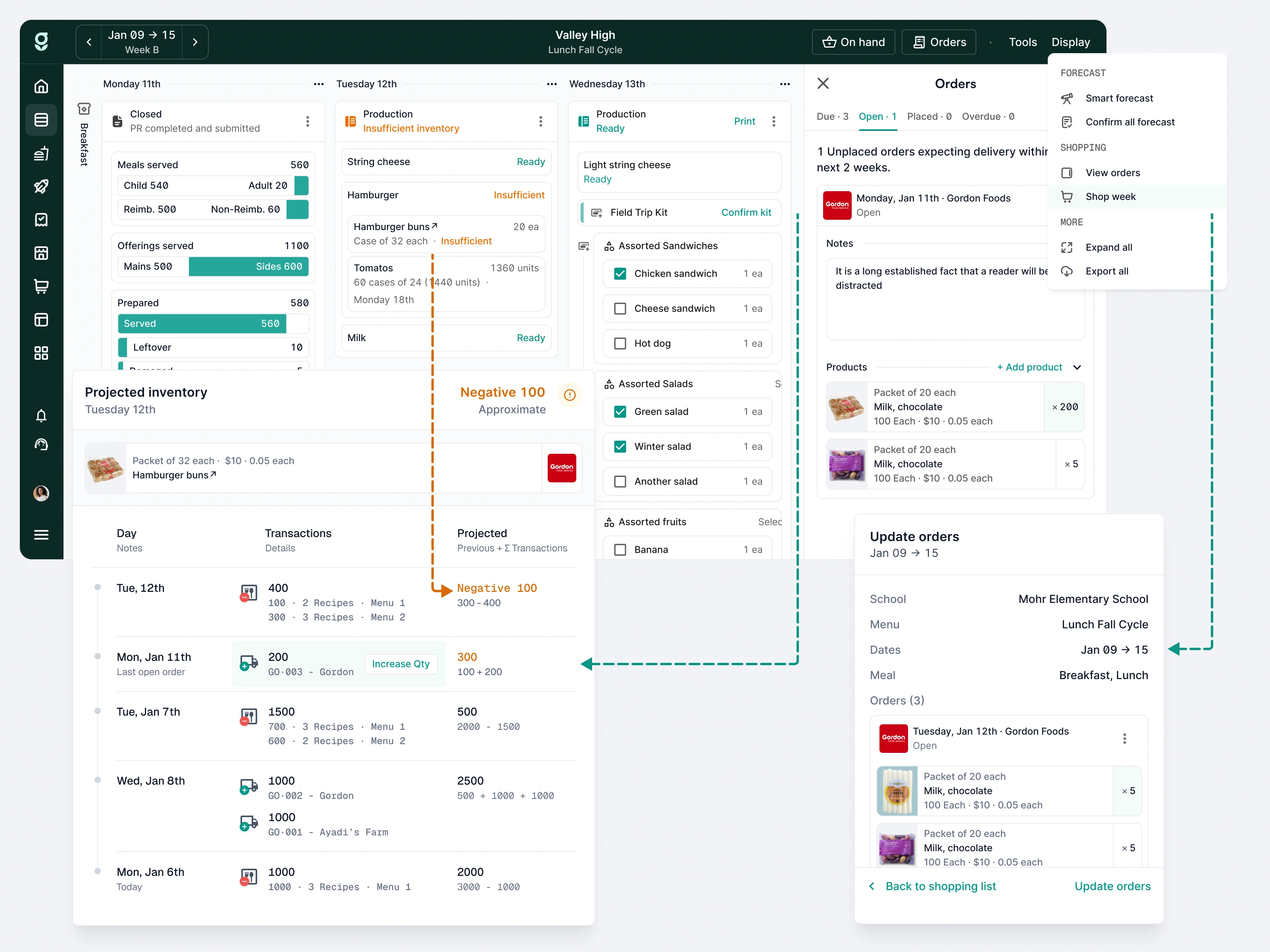
Each day of a school's week shows where it stands: closed with the production record submitted, in production with a warning, or ready. A day in production lists what it needs and flags anything short. Here Tuesday is short on hamburger buns. Open the projection and you see why: inventory is projected day by day from what is on the shelf, what confirmed menus will use and what deliveries are coming, and on Tuesday it goes 100 under. The fix sits on the same screen: an open order arriving Monday can be increased, and the change flows back into the projection.
Forecasts and shopping live in one menu. Smart forecasts fill in planned portions from history, a director can confirm every forecast for the week at once, and Shop week turns the confirmed forecasts into vendor orders for the right delivery days. Orders are tracked as due, open, placed or overdue, and a panel lists unplaced orders expecting delivery in the next two weeks so nothing is forgotten.
5. Production records, on paper and on screen
A production record is the daily document a USDA review asks for: what was planned, prepared, served, discarded, damaged and saved, recipe by recipe, with temperatures. In Gaia it is created when the menu is published and filled in as the day goes. On screen it is a dense grid with every recipe and every product inside it, and a column for each count.
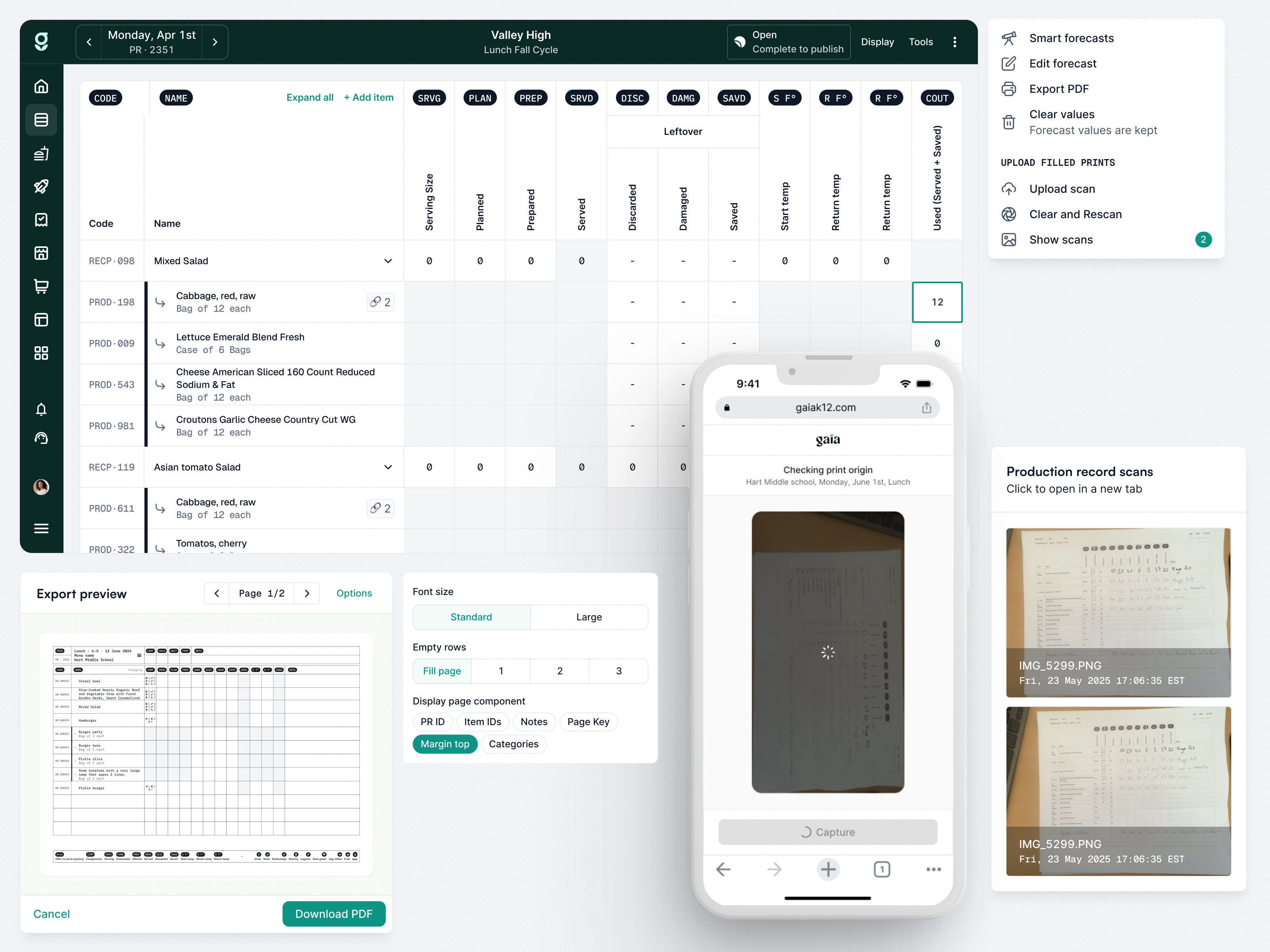
But many kitchens are not ready to put a tablet next to the line, and some never will be. So I designed a hybrid workflow instead of forcing one. Staff export a print-ready sheet, with options for font size, empty rows to fill the page and which parts of the page to show. They fill it in by hand during service, then scan it with a phone. Gaia checks which school, day and meal the print came from, keeps the scans on the record, and processes the numbers in bulk, so the kitchen keeps its habit and the office gets digital data.
6. Front of house: the register
Everything the back of house prepares ends at the line. Whether a student eats for free, at a reduced price or at full price is a federal decision, and it has to be right on every single transaction. If it is wrong, the district either loses money or overcharges a family, and then files the wrong claim.
The point of sale runs on a tablet or kiosk in the cafeteria, and cafeteria Wi-Fi is unreliable, so the app works offline first. Everything it needs to serve students is stored on the device, and it syncs with the platform when it can. The cashier picks the meal, starts a session, and rings up one student at a time, or a whole class at once in classroom mode.
A student is looked up by ID, name, PIN or barcode. The price follows their eligibility automatically, so the cashier never sees who qualifies for free meals, and neither does the student behind them in line.
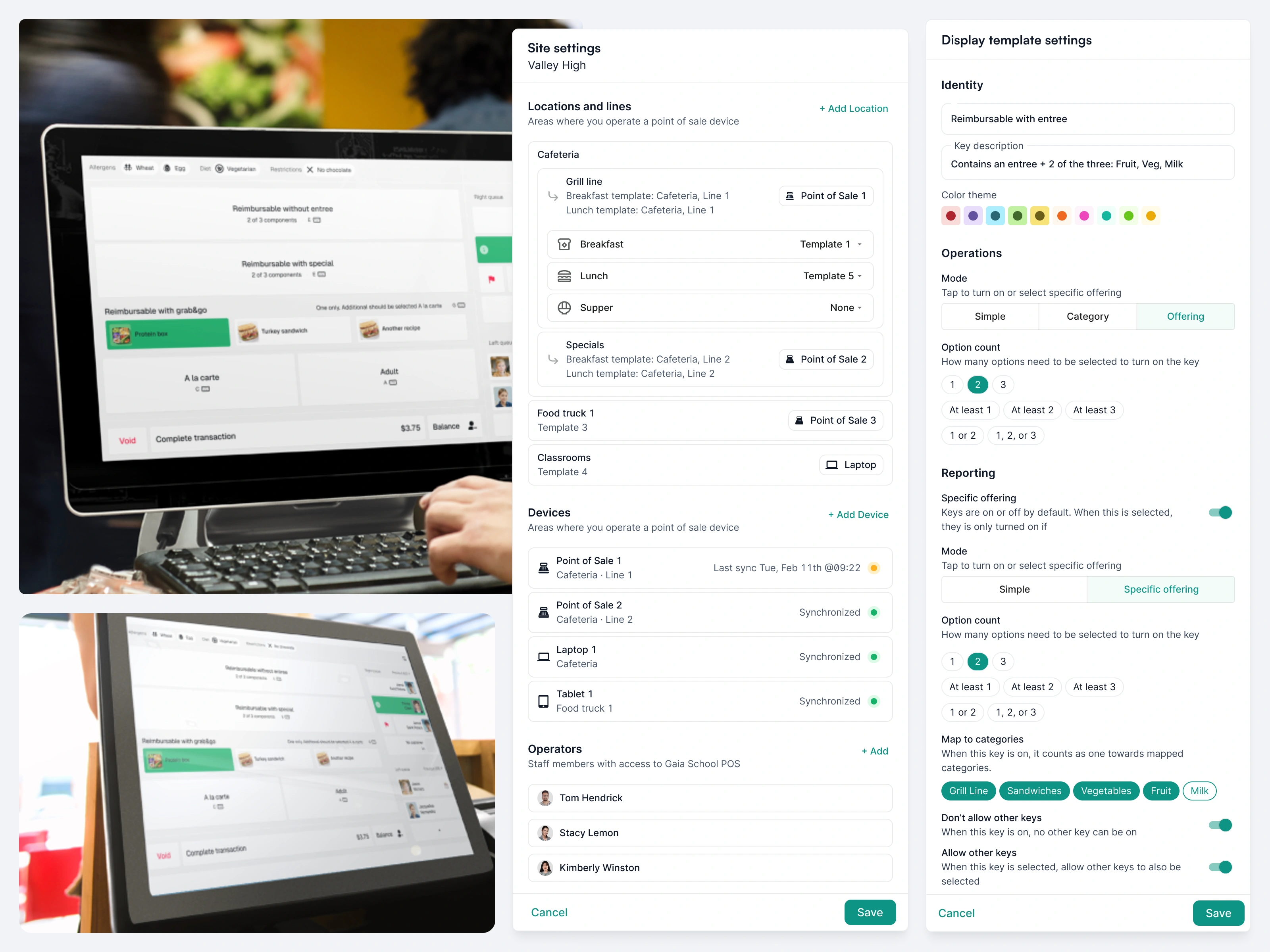
The settings behind the register were most of the design work. A site has locations and lines, a grill line and a specials line, a food truck, classrooms, and each one gets its own template per meal and its own device. Keys on the register are configured, not hard-coded: by category or by specific offering, with how many options turn a key on, which categories it counts toward, and whether other keys may be selected with it. That is how one register supports every cafeteria layout and every reimbursement rule without a custom build.
Gaia treats allergens as safety-critical and dietary restrictions as information. The nine allergens in federal labeling law are tracked by default, and districts can add their own. A student’s allergens follow them to every cafeteria interaction, and the register warns staff before they serve a meal that could cause harm.
7. Students and eligibility
Families who aren’t certified automatically through state data apply with a form. It asks which students are applying, how many people live in the household, every source of income and how much it brings in a month, whether the household already gets SNAP, TANF or similar benefits, and any special circumstances like foster care or homelessness. Program participation and special circumstances qualify a student for free meals without an income review, so the form asks about them before it asks about income. It is a public form. Parents fill it in on a phone, often in a second language, and the last screen is a legal signature. Families can also apply on paper, and staff enter those by hand.
District staff review each application against the federal income thresholds and approve or deny it, and the family gets an email with the result. Whichever path a student came through, they end up with one eligibility status, and that status is checked at the register on every transaction.
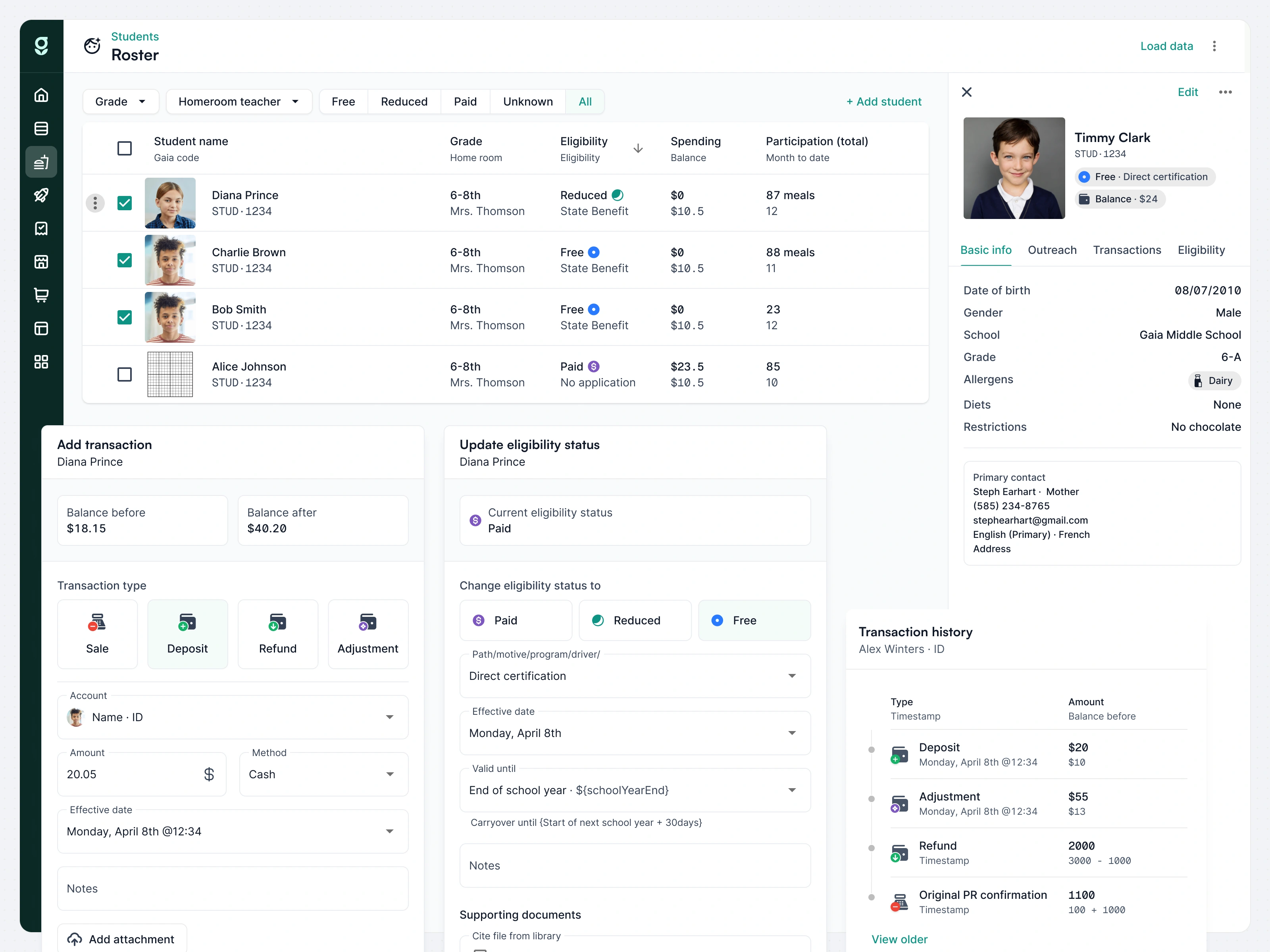
The roster puts each student's eligibility (free, reduced or paid), balance and participation in one row, filtered by grade, homeroom or status. A profile shows allergens, diets and restrictions next to the family's contact and language. Staff can add a deposit, refund or adjustment, or change an eligibility status with its reason, effective date and how long it is valid, and every change lands in the student's transaction history.
Every year, districts have to re-check a sample of the applications they approved. Gaia draws it by the federal rule, 3% of approved applications up to 3,000, with a repeatable random draw so running it twice gives the same sample. It sends the notices, records what each family sent back, and produces the report the state asks for. A district where every school serves free meals to everyone is exempt, and Gaia knows that too.
8. What families see
When a nutrition director publishes a menu plan, it can go out as a public page that parents browse by school and day. The district decides whether it is visible, and it can show the menu in Spanish or Chinese as well as English. Because it is the published plan itself, a change in the office is a change on the page.
Every dish on the public menu shows its allergens and its nutrition, so a parent can check a meal before their child reaches the line. Some districts also publish a nutrition calculator, where families look up a recipe and change the portion size to see what their student is eating.
A good recipe in one district can feed students in another. A district publishes a recipe to a shared catalog, and Gaia shows how many of its ingredients are new to that catalog before anything goes out. Another district finds it, sees how many of its ingredients it already has in its own pantry, and copies it into its recipes, with each ingredient matched to an item it already buys.
9. What it changed
The back of house takes hours of retyping off a nutrition team every week, and more for larger teams. Tighter links between forecasting, inventory and ordering cut food waste, because food is ordered for confirmed menus instead of from a par sheet and memory.
The hours matter, but the change I notice most is quieter. Directors stop keeping a second copy of anything. The menu is the menu, the recipe is the recipe, and the record a reviewer asks for already exists. That only works because the objects underneath were modeled once, carefully, and every screen since has been built on top of them.
The website that explains all of this to districts is its own story: the new Gaia website.