

MyDay: Recording a day without sending it anywhere
Recording a day without sending it anywhere
A sample every two seconds, Claude windows traced to their projects, a benchmark that turned the plan around, a small model that only works while you're away, and sync with no server of ours.
Why
Every decision had to keep one promise: your day stays on your devices. That ruled out a server of ours, a cloud model by default and any relay in the middle.
Two-second sampler
The front app, window and tab, idle and lock state. A crash loses two seconds at most.
Rules before models
A benchmark on real days: rules plus your fixes beat a 2B model, so the model only gets what's left.
A model while you're away
Qwen 2B runs when the screen is locked or you've been away five minutes, then unloads.
No server of ours
Encrypted change files over Wi-Fi and your own iCloud Drive. Pairing is a QR code.
How it’s built
- Core
- One Rust crate shared by the Mac and the iPhone, a React interface, Tauri 2
- Labels
- Your edit, rules, call defaults, AI, your fixes, a catalog of about 700 apps and sites
- Model
- Qwen3.5-2B, 1.28 GB, through llama.cpp, prompt cache off
- Sync
- XChaCha20-Poly1305 change files, Bonjour and iCloud Drive, a 24-word recovery phrase
- Tags
- Rust, Tauri 2, SQLite, Qwen 2B, MCP
The full story
How MyDay records and labels a day on your own devices
MyDay is a Tauri 2 app with one Rust core, shared by the Mac and the iPhone, and a React interface. A small Swift plugin on the phone talks to HealthKit, location and the camera. I built it the way I built Propaganda, by directing Claude: 146 commits from 17 to 25 November, and 145 of them carry Claude as a co-author.
The product is in the main case study. This piece is about how it works, and about the one promise every decision had to keep: your day stays on your devices. That promise ruled out the easy versions of almost everything. No server of ours, no cloud model by default, no relay in the middle, and no telemetry to tell me when I got it wrong.
01A sample every two seconds
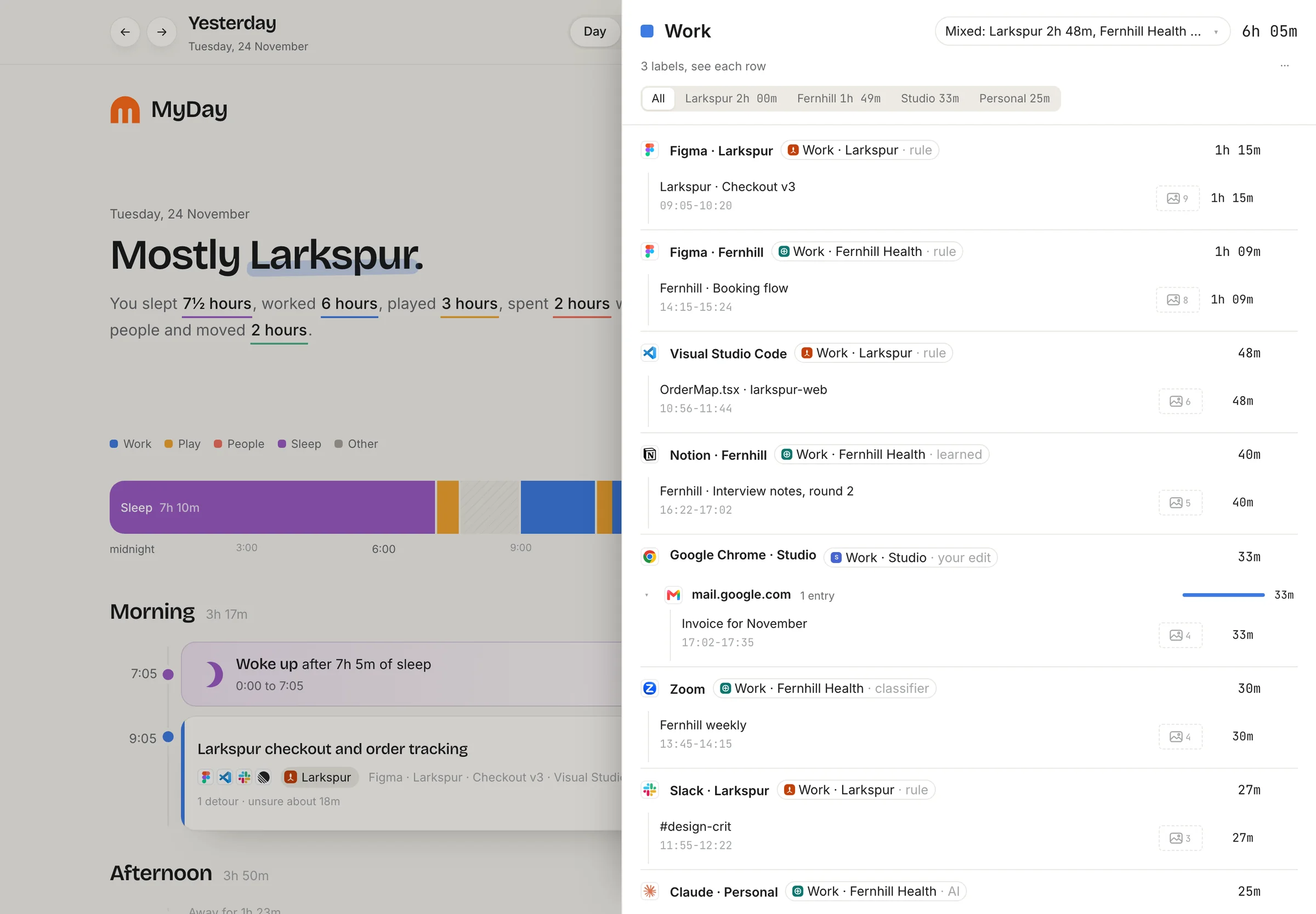
Every two seconds the Mac app writes down what is in front of you: the app, the focused window's title, the address of the front tab in Safari and the Chrome family, how long since you last touched the keyboard or mouse, and whether the screen is locked. A pure state machine turns those samples into sessions and breaks. Five minutes with no input ends a session, backdated to the last input, so a coffee break doesn't count as twenty minutes of Figma. The open session is rewritten every two seconds, so a crash loses two seconds at most.
The interface costs nothing while you aren't looking at it. The web view is created when you open a window and destroyed when you close it, which keeps the app at about 13 MB in the background. MyDay's own windows don't count as activity either: while you look at your day, the time goes to whatever was in front before.
It never records keystrokes, message bodies, mail, audio or the contents of your documents, and it skips incognito windows. At the Plus and Full levels it takes a screenshot every ten seconds while you're at the Mac and reads it with Apple's own OCR, which takes a tenth of a second and almost no memory. Screenshots are kept for three days, capped at 1 GB, and never synced.
02Which Claude is which
A window title is often useless. Every Claude window is called "Claude", and I spend a large part of my day in Claude. So MyDay reads the Claude app's own small session files to see which session is on screen, and which account is signed in, so only that account's sessions count.
Then it works out the project. A Claude Code session only records the folder it started in, and a session that starts in one repository often edits another. So MyDay reads the last 4 MB of the session's transcript and collects the file paths of the last hundred or so tool calls. Edits weigh most and later calls weigh more. It maps the paths to their git repository and credits the top one, rechecking at most once a minute. It reads paths only, never the conversation.
The last two commits before this piece were both about Claude. On 25 November an hour in one project showed up under the default one, because an artifact open at full width hid the project's name from the window. Now a Claude window that can't be read takes the project of the readable Claude windows around it: sure when both sides agree, unsure when only one does, and unsure with no project when they disagree, so Quick check asks. A thread that showed no project takes the one known for it first, from the remembered thread list, another window of the same thread, a fix you made, or its screenshots.
The same care went into localhost. Each local port is its own website, named after the project serving it: MyDay asks the system which process listens on the port and takes that process's git folder. "localhost:5173" tells you nothing a week later; "larkspur-web" does. The port's folder is remembered for twelve hours after the server stops, and a preview deploy on Vercel, Netlify or Cloudflare Pages, opened in the same browser within half an hour, lends its project too.
03The benchmark that killed the plan
The plan was to label the day with a small language model on the Mac. Before building it, on 20 November, we wrote a benchmark. The pass bars were set before anything ran: 95% right on work, play or other, 90% right on the project from the fourth day, and names with at most 2% invented details. Every candidate had to run on my M1 Pro with 16 GB, next to everything else I use.
It ran on two kinds of days. Synthetic people, each with five days of windows written by a large model, and three of my own real days, 118 blocks, labeled ahead of time as the truth.
| Labeling system, on my real days | Work or play right | Right project |
|---|---|---|
| My rules plus a tiny classifier that learns from my fixes | 86% | 81% |
| The same, then Qwen 2B for unsure blocks | 84% | 66% |
| The same, then Qwen 4B for unsure blocks | 82% | 90% |
| Qwen 2B on its own | 71% | 2% |
| Calling everything work | 72% | 35% |
A two-billion-parameter model on its own did no better than calling everything work, and almost never picked my project. Nothing local met the bars. My own rules and fixes came closest, and the larger model only helped with projects, at about 2.6 GB of memory. The plan turned around: rules first, the model only for what the rules can't settle.
The synthetic data taught a second lesson. A small student model trained on about ten thousand synthetic windows reached 93% agreement on synthetic windows and stayed at 77% on real ones, barely above calling everything work at 74%. Synthetic days don't transfer, so the training data is your own fixes, and most of the gain arrives by the second or third day.
04The order of who decides
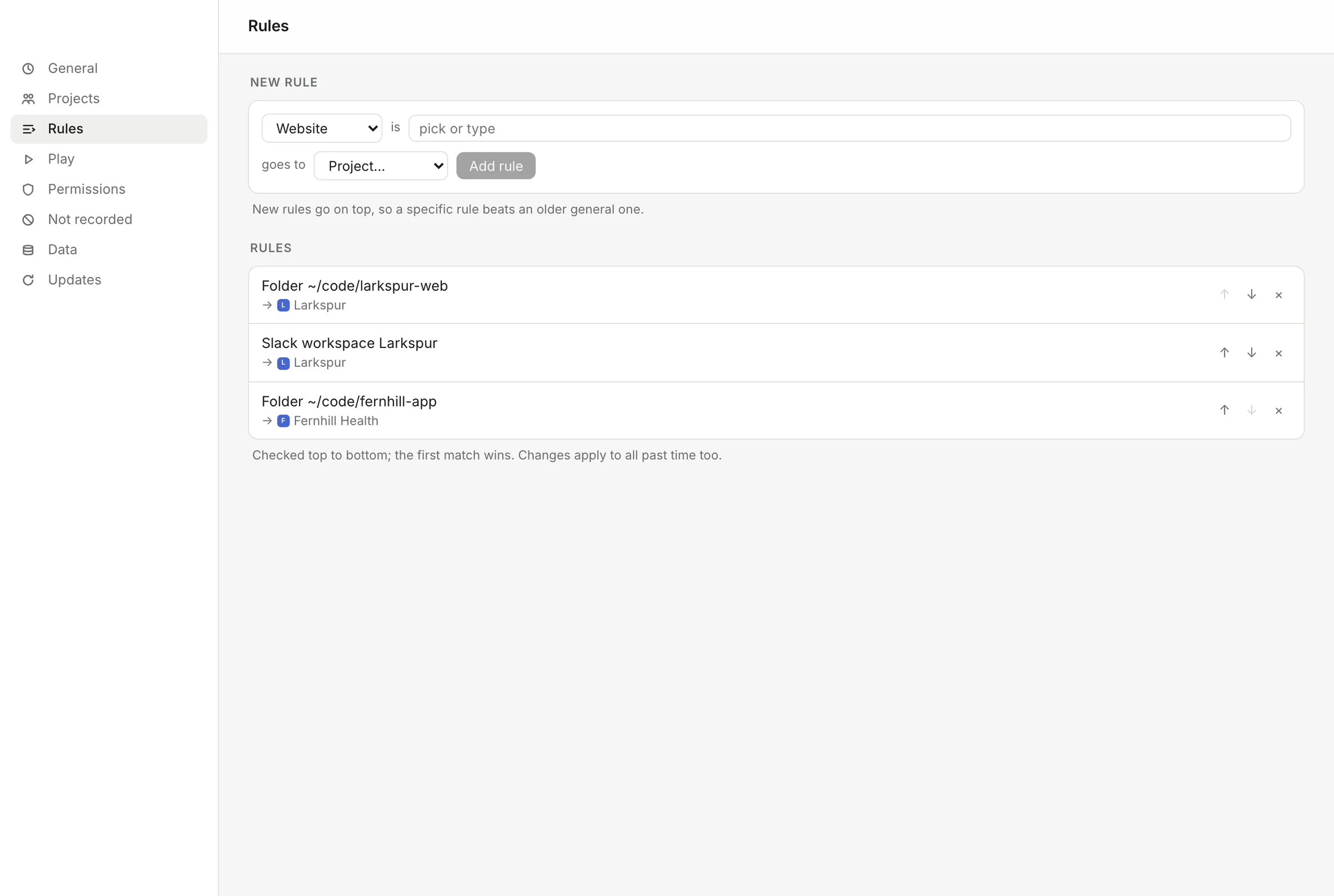
So MyDay labels a window in a fixed order, and the first answer wins.
- Your edit. You said so; it is certain.
- Your rules. A folder, a Slack workspace, a site, a Figma team.
- Call defaults. A Zoom, Meet or Slack call is People, and Work for that workspace's project.
- The AI's label, if the model has looked at this window already.
- The fast engine. The same window you fixed before; then the catalog of about 700 apps and sites, unless the entry is ambiguous or you have fixed that place before; then the classifier.
- Default: work, marked unsure.
The classifier is small on purpose: hashed character fragments of the title, app and address, a logistic regression and an exact memory of your fixes. It retrains in milliseconds, so every fix counts at once, and it never leaves the device. It is only allowed to overrule the catalog after you have fixed that place yourself, because a classifier trained on a few dozen mostly-work fixes calls everything work, shopping included.
05A model that works while you're away
The model that is left is Qwen3.5-2B, quantized to 1.28 GB on disk, through llama.cpp. It runs only when the screen is locked or you have been away for five minutes, and only on the windows the fast engine is unsure about. It loads, works through the longest unsure windows first, and unloads. It stops the moment you are back. It never competes with your work for memory.
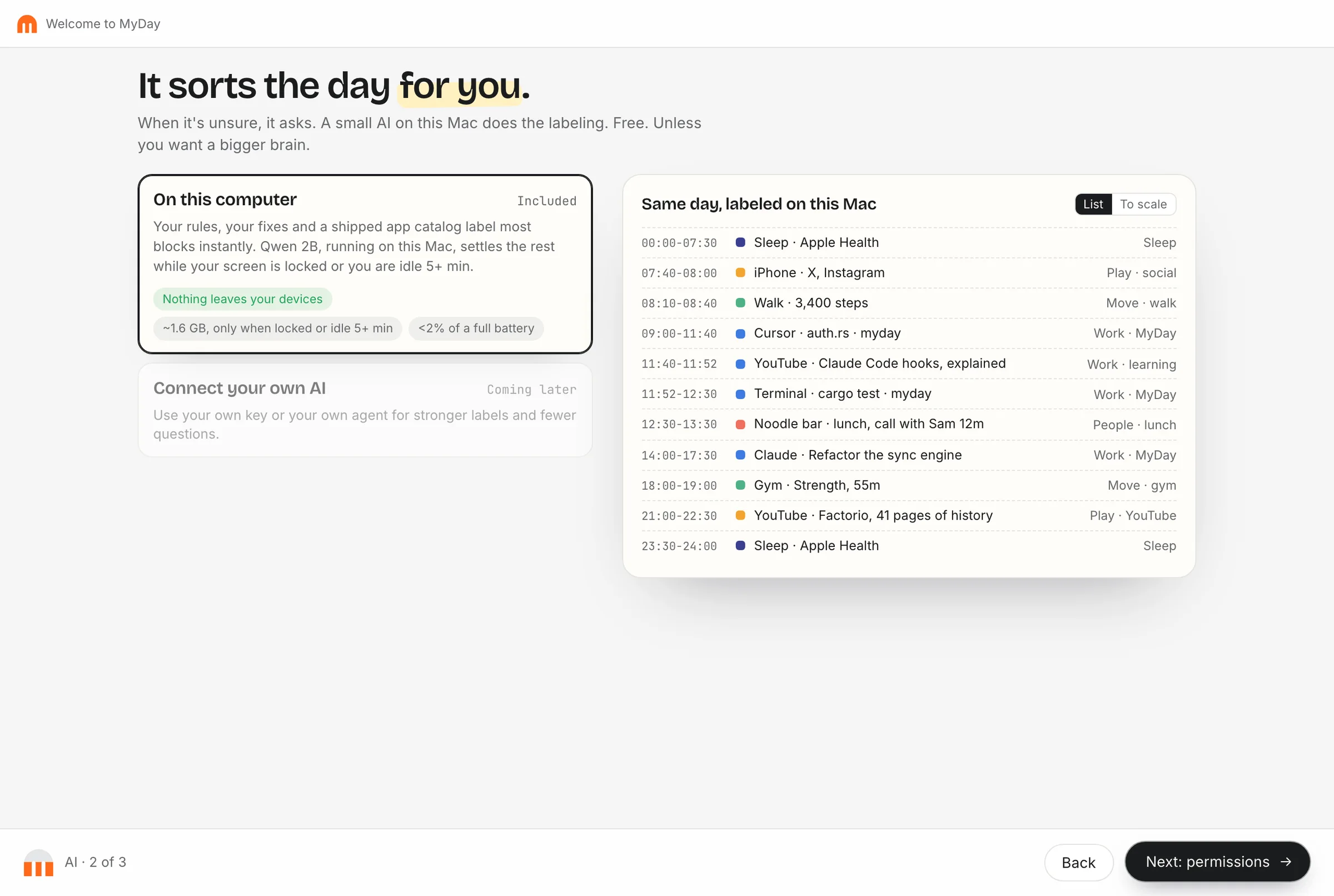
Testing it taught me two things. llama.cpp's server keeps a prompt cache by default, and over a long run its footprint grew to 7.9 GB, so MyDay starts it with that cache turned off. And the 2B model answers 95% sure to everything, so its confidence means nothing. An AI label that agrees with the fast engine is stored as fairly sure. One that disagrees is stored as unsure, which keeps the block in Quick check, so the model can never quietly overrule a cheaper engine that might be right.
I also compared reading screenshots with a vision model against reading their text. Qwen's vision model took three to five seconds per image, used almost 3 GB and got about one in eight right. Apple's OCR read the same screen in a fifth of a second, and passing that text to the text model got about four in eight. So there is no vision model in MyDay.
06Sync with no server of ours
The Mac and the iPhone have to share a day, and a MyDay server in the middle would look fishy even if it were encrypted. So there isn't one. Each device writes append-only change files, each change with its own id, sealed with XChaCha20-Poly1305 under a 32-byte key only your devices hold. They travel two ways at once: directly over Wi-Fi, found with Bonjour, and through a MyDay folder in your own iCloud Drive. Apple stores files it can't read, and a change that arrives by both paths is applied once.
iPhone
Health: sleep, workouts, stepsPlaces you visitNo model on the phoneShows the Mac's labeled days
Your Mac
The sampler, every 2 sRules, classifier, catalogQwen 2B while you're awayOne SQLite fileThe only place a day is labeled
Your own cloud
iCloud Drive / MyDayEncrypted change filesOr Wi-Fi only, no cloudNothing comes to us
Pairing is a QR code on the Mac carrying the key, and a 24-word recovery phrase brings it back. The iPhone picks the iCloud folder once in Files and keeps a bookmark to it, which avoids an iCloud container and the paid developer account it would need. The phone stays current with a long poll to the Mac that wakes it the moment a new file is shared.
It went wrong in an instructive way. The Mac republished the whole of today, 240 KB, every minute, and by the evening of 22 November the phone was 933 files behind, still working through the night before. Now today is shared at most every five minutes, superseded copies of a day are dropped from the outbox, and a device that fell behind fetches the newest files first. An earlier bug let a fix bounce between the Mac and the phone forever; fixes that came from another device are no longer echoed back.
07Every screen you own
Apple doesn't let an iPhone app read Screen Time by app name. It hands out opaque tokens. The Mac can do better: with Full Disk Access it reads the app-focus stream that macOS syncs from your iPhone, about four weeks of which app was on screen when. So phone time arrives on the Mac with names attached, labeled by the same catalog, and no screen-time scraping on the phone at all.
The TV got the same treatment on 22 November. Android and Google TV sets keep about a week of which app was on screen. MyDay finds them on the local network, connects over ADB and reads that log read-only, every three hours, or every fifteen minutes while something is playing. An evening on the couch shows up in the day, with no app installed on the TV.
There is no chat in MyDay. If you want to ask about your week, a local MCP server lets Claude, or any assistant that speaks MCP, read your days and add or remove rules the way you would. Deleting time and raising the permission level are left out on purpose. Those need a tap on the Mac.
08A copy of my day to design on
The redesign in the main case study needed real data, and I didn't want any screen built against my real database. So on 22 November MyDay got a flag, --dev-api, that serves the app's commands over HTTP on the Mac for a browser with live reload. It works on a copy of the database, taken read-only, so anything done in the browser, fixes, rules, renames, lands in the copy and never in the real day. That is how the Journal and the Dial were compared on a real Tuesday without installing either.
The app also has a preview mode with no database at all: every command falls back to a made-up day in the browser. The screenshots in these two pieces come from it, after I rewrote that day as a freelance designer with two invented clients. It is the same interface code, so the screens are real; only the person isn't.
09What broke
| What broke | Why, and the fix |
|---|---|
| The iPhone app opened to a black screen | Its config had no window for the web view; the app now creates its own |
| Then to an empty Today | A plugin call on the main thread deadlocked; no command runs there now |
| Bottom sheets on the phone | Rebuilt three times in one evening, until a finger could drag them like iOS sheets and Reduce Motion couldn't strand them off screen |
| A sync flood of 933 files | Today was republished every minute; now at most every five |
| Fixes bouncing between devices | A fix from the phone was echoed back by the Mac; it no longer is |
| Every visit saved as "Place" | The phone now names visits, Home from where nights are spent, else from the map |
| Phone totals that didn't match their tiles | The panels summed Mac windows only; now every second is handed back to what put it there |
Each fix is a commit with a sentence saying what was wrong. When you manage the engineering instead of typing it, that sentence is the history you can actually read.